Table of Contents
Imagine you’re standing in a warehouse filled with a million tiny objects, and someone asks you to find the red one closest to the northeast corner. You could check every single object, one by one. Or you could organize the warehouse first, divide it into rooms, divide the rooms into shelves, divide the shelves into bins, and walk straight to the right one. That, in essence, is what an octree does for three-dimensional space.
What Is an Octree?
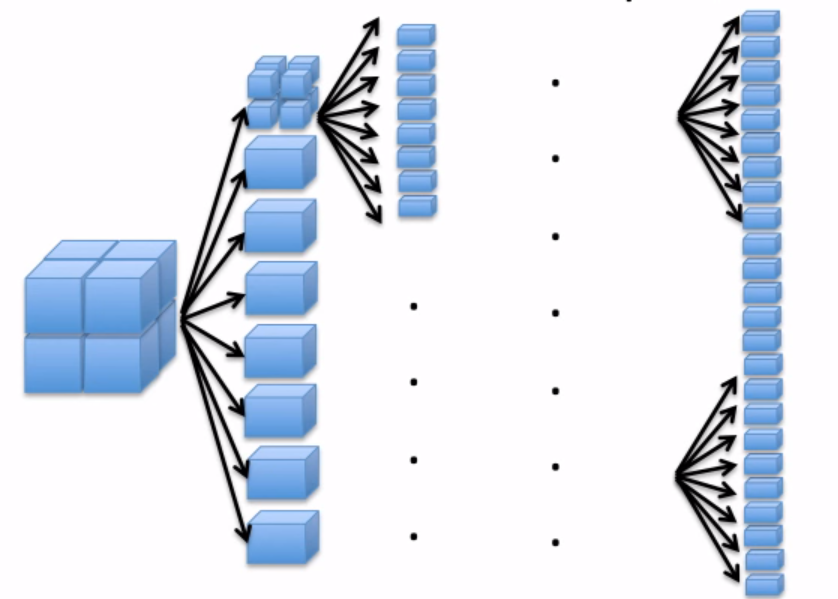
An octree is a tree data structure in which each internal node has exactly eight children. The name comes from the Greek root oct- (meaning eight) combined with tree. Just as a binary tree splits data into two branches, an octree splits three-dimensional space into eight smaller volumes called octants.
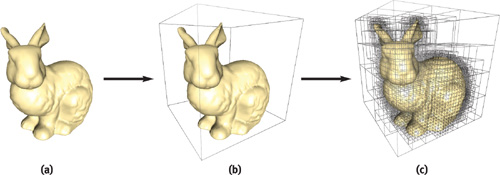
The idea is elegant in its simplicity. You start with a single bounding box that contains all your geometry or data points. Then you cut it in half along the X axis, the Y axis, and the Z axis simultaneously, producing eight equally sized sub-boxes. For any sub-box that contains more than one point, you repeat the process. Sub-boxes that contain zero or one point are left alone. These become the leaf nodes of the tree.
The octree can be formed from a 3D volume by doing the following steps:
- Divide the current 3D volume into eight boxes
- If any box has more than one point, then divide it further into boxes
- Do not divide the box which has one or zero points in it
- Do this process repeatedly until all the boxes contain one or zero point in them.
The octree doesn’t just store objects. It structures space itself. That distinction is what makes it powerful.
Where Octrees Are Used
Octrees aren’t a niche academic curiosity. They are one of the most widely used spatial data structures in computing, appearing anywhere that 3D space needs to be searched, organized, or rendered efficiently.
- Game Development Open-world games use octrees for world streaming, loading only the regions a player can see. They also power collision detection. Instead of checking every object pair, the engine only checks objects that share the same spatial cell.
- Architecture & BIM Complex building models with thousands of facade panels, structural elements, or MEP systems use octrees to organize components spatially, enabling fast lookups, clash detection, and efficient modification.
- Robotics & Autonomous Vehicles LiDAR scanners produce millions of 3D points per second. Octrees compress and organize this point cloud data so robots and self-driving cars can understand their environment in real time.
- Scientific Visualization Medical imaging (CT and MRI scans), fluid dynamics simulations, and molecular modeling all rely on octrees to render volumetric data at varying levels of detail without overwhelming memory.
- Product Design & Manufacturing Procedural product configurators use octrees to manage variations efficiently, generating and organizing parametric geometry for product families that share logic but differ spatially.
- 3D Reconstruction & GIS Algorithms like Poisson surface reconstruction use octrees to convert raw point cloud scans of terrain, cities, or objects into clean, watertight 3D meshes at adaptive resolution.
The common thread across all of these is the same problem: there’s too much data to process naively, and spatial structure is the key to making it manageable.
class Point:
    def __init__(self, x, y, z, data=None):
        self.x = x
        self.y = y
        self.z = z
        self.data = data


class BoundingBox:
    def __init__(self, x_min, y_min, z_min, x_max, y_max, z_max):
        self.x_min = x_min
        self.y_min = y_min
        self.z_min = z_min
        self.x_max = x_max
        self.y_max = y_max
        self.z_max = z_max

    def contains(self, point):
        return (
            self.x_min <= point.x <= self.x_max and
            self.y_min <= point.y <= self.y_max and
            self.z_min <= point.z <= self.z_max
        )

    def subdivide(self):
        mid_x = (self.x_min + self.x_max) / 2
        mid_y = (self.y_min + self.y_max) / 2
        mid_z = (self.z_min + self.z_max) / 2

        return [
            BoundingBox(self.x_min, self.y_min, self.z_min, mid_x, mid_y, mid_z),
            BoundingBox(mid_x, self.y_min, self.z_min, self.x_max, mid_y, mid_z),
            BoundingBox(self.x_min, mid_y, self.z_min, mid_x, self.y_max, mid_z),
            BoundingBox(mid_x, mid_y, self.z_min, self.x_max, self.y_max, mid_z),
            BoundingBox(self.x_min, self.y_min, mid_z, mid_x, mid_y, self.z_max),
            BoundingBox(mid_x, self.y_min, mid_z, self.x_max, mid_y, self.z_max),
            BoundingBox(self.x_min, mid_y, mid_z, mid_x, self.y_max, self.z_max),
            BoundingBox(mid_x, mid_y, mid_z, self.x_max, self.y_max, self.z_max),
        ]


class OctreeNode:
    def __init__(self, boundary, max_points=1, depth=0, max_depth=10):
        self.boundary = boundary
        self.max_points = max_points
        self.depth = depth
        self.max_depth = max_depth
        self.points = []
        self.children = []
        self.divided = False

    def insert(self, point):
        if not self.boundary.contains(point):
            return False

        if not self.divided and len(self.points) < self.max_points:
            self.points.append(point)
            return True

        if not self.divided:
            if self.depth >= self.max_depth:
                self.points.append(point)
                return True
            self._subdivide()

        for child in self.children:
            if child.insert(point):
                return True

        return False

    def _subdivide(self):
        sub_boxes = self.boundary.subdivide()
        for box in sub_boxes:
            self.children.append(
                OctreeNode(box, self.max_points, self.depth + 1, self.max_depth)
            )
        self.divided = True

        # redistribute existing points
        for point in self.points:
            for child in self.children:
                if child.insert(point):
                    break
        self.points = []

    def query(self, boundary):
        found = []

        if not self._intersects(boundary):
            return found

        for point in self.points:
            if boundary.contains(point):
                found.append(point)

        if self.divided:
            for child in self.children:
                found.extend(child.query(boundary))

        return found

    def _intersects(self, other):
        return not (
            other.x_min > self.boundary.x_max or
            other.x_max < self.boundary.x_min or
            other.y_min > self.boundary.y_max or
            other.y_max < self.boundary.y_min or
            other.z_min > self.boundary.z_max or
            other.z_max < self.boundary.z_min
        )
Why Octrees Are So Effective
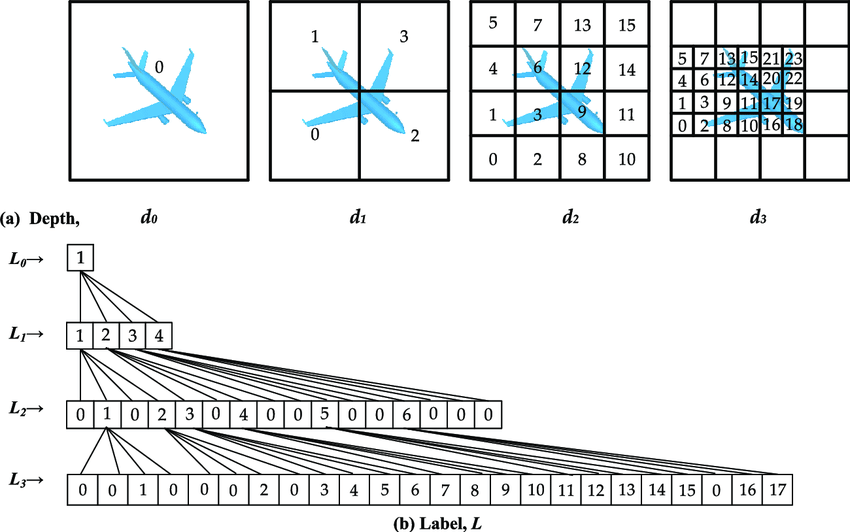
There are many spatial data structures: KD-trees, BVH trees, uniform grids, R-trees. So why do octrees appear so consistently across disciplines? The answer comes down to a combination of properties that are particularly well-suited to 3D work.
Adaptive Resolution. Octrees allocate detail only where it’s needed. Dense clusters of geometry get subdivided deeply; empty regions remain coarse. This means memory and computation are spent where they matter most.
Logarithmic Search. Finding a point in an octree takes O(log n) time instead of O(n). In a scene with a million points, that’s the difference between checking roughly 20 nodes and checking a million.
Natural Hierarchical LOD. Each level of the tree represents space at a different granularity. This makes level-of-detail rendering almost free. Show coarse nodes at distance, detailed nodes up close.
Dynamic & Scalable. New elements can be inserted into an octree without rebuilding the entire structure. The tree grows where needed and stays lean where it doesn’t, making it ideal for evolving datasets.
Spatial Queries. Nearest-neighbor lookups, range searches, and ray-casting all benefit from the octree’s spatial partitioning. Only relevant branches of the tree are traversed, skipping vast empty regions.
Intuitive 3D Mapping. Unlike KD-trees (which split along one axis at a time), octrees split all three axes simultaneously. This maps naturally to how we think about 3D space, as nested boxes within boxes.
When Complexity Outgrows Traditional Modeling
Traditional 3D modeling works well when you’re dealing with dozens or even hundreds of objects. You can select them, move them, name them, and keep track of what’s where. But there’s a threshold, and most designers hit it eventually, where this approach breaks down.
Consider a parametric facade with 12,000 individual panels. Or a voxel-based environment with hundreds of thousands of elements. Or a procedural city with buildings, roads, and vegetation generated from rules. At this scale, you can’t manage geometry manually. You can’t select individual elements in a viewport. You can’t even load it all into memory at once without some form of spatial organization.
This is the moment where the challenge shifts from creating geometry to managing complexity. And it’s exactly where octrees, and computational design more broadly, become essential. Instead of placing each object by hand, you define the rules for how objects are distributed. Instead of searching through a flat list of geometry, you traverse a tree. The structure does the heavy lifting.
The designer’s role shifts from placing individual objects to defining the systems that organize them. That’s what makes computational design fundamentally different.
Creating an Octree in BeeGraphy
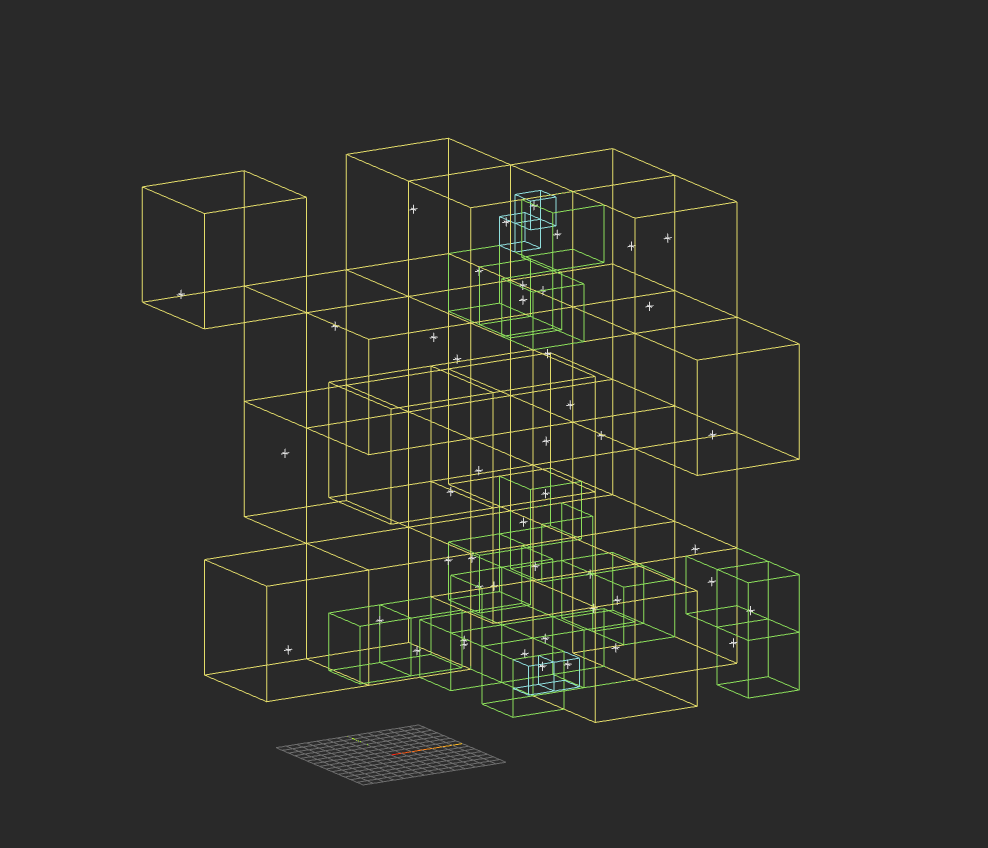
An Octree in BeeGraphy is created by recursively subdividing a 3D bounding volume into eight smaller volumes and assigning elements to the appropriate subdivisions based on their position.
The process begins by defining a bounding box that contains all the points or geometry. This bounding box represents the root node of the Octree.
The root volume is then divided into eight equal sub-volumes. Each sub-volume is evaluated to determine which points lie inside it. If a sub-volume contains more than one point, it is subdivided again into eight smaller volumes. Sub-volumes containing one or zero points are not subdivided further and become leaf nodes.
This subdivision process continues recursively until all points are distributed across leaf nodes that meet the defined condition.
Step 1: Define the bounding box. Start by creating a populate 3D node that creates a box encompassing all the input points. This box becomes the root node of the octree.
Step 2: Subdivide into eight octants. Split the bounding box in half along all three axes, producing eight equally-sized child boxes.
Step 3: Test point membership. For each of the eight child boxes, determine which input points fall inside it.
Step 4: Recurse or terminate. If a child box contains more than one point, repeat the subdivision. If it contains zero or one point, mark it as a leaf node.
Step 5: Collect the tree. The resulting hierarchy of nested boxes forms the octree. Each leaf node contains the final assigned point(s).
The TypeScript Shortcut
For designers comfortable with code, BeeGraphy also offers a TypeScript node that can express the entire octree algorithm in a few dozen lines. Instead of wiring up the recursive logic visually, you write it as a function, and the result generates in seconds. This hybrid approach (visual nodes for spatial setup, code for recursive logic) often produces the cleanest and most maintainable workflows.
The output is the same either way: a tree structure where each node represents a spatial volume, leaf nodes contain the final points, and the entire system can be queried, modified, or extended through BeeGraphy’s parametric pipeline.
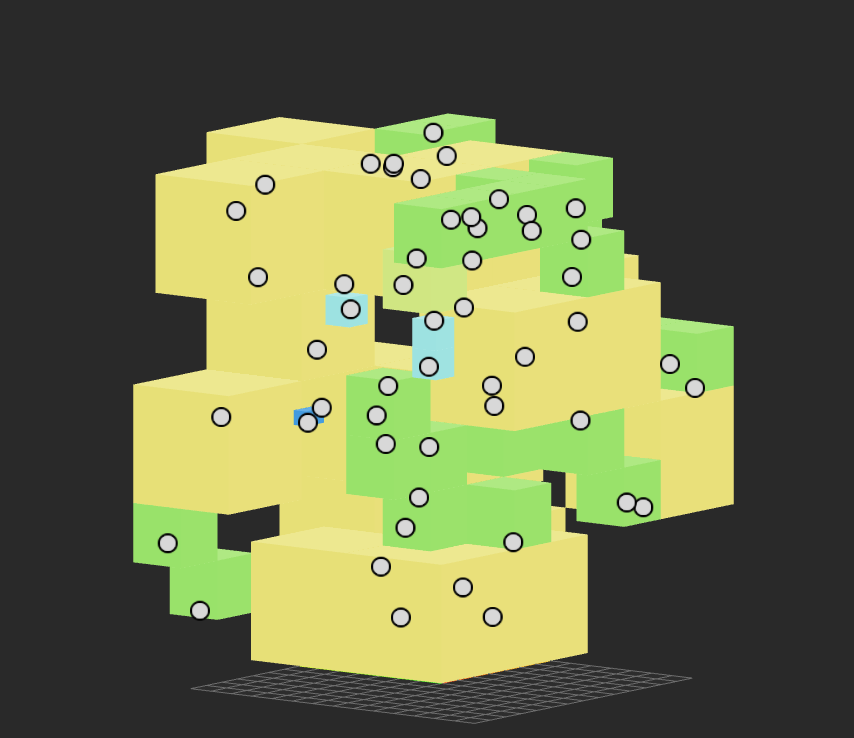
The result is a tree structure where each node represents a spatial volume and each leaf node contains the final assigned points.
This structure forms the Octree.
// ===== OCTREE (Self-Contained) =====
type OctreeInPorts = {
  boxWidth: Value<number>;
  boxLength: Value<number>;
  boxHeight: Value<number>;
  numPoints: Value<number>;
  seed: Value<number>;
  group: Value<number>;
};

async ({
  boxWidth: boxWidthPort,
  boxLength: boxLengthPort,
  boxHeight: boxHeightPort,
  numPoints: numPointsPort,
  seed: seedPort,
  group: groupPort
}: OctreeInPorts) => {

  const boxW = boxWidthPort.value || 100;
  const boxL = boxLengthPort.value || 100;
  const boxH = boxHeightPort.value || 100;
  const numPoints = Math.floor(numPointsPort.value) || 50;
  const seed = seedPort.value || 42;
  const maxGroup = Math.floor(groupPort.value) || 1;

  // Seeded random generator
  const seededRandom = (s: number) => {
    const x = Math.sin(s * 9999) * 10000;
    return x - Math.floor(x);
  };

  // Generate random points
  const points: number[][] = [];
  for (let i = 0; i < numPoints; i++) {
    points.push([
      seededRandom(seed + i * 3) * boxW,
      seededRandom(seed + i * 3 + 1) * boxL,
      seededRandom(seed + i * 3 + 2) * boxH
    ]);
  }

  const allBoxes: any[] = [];

  // Cube size
  const size = Math.max(boxW, boxL, boxH);

  // Depth colors
  const depthColors = [
    "#ff0000", "#ff8800", "#ffff00", "#00ff00",
    "#00ffff", "#0088ff", "#8800ff", "#ff00ff"
  ];

  // Draw wireframe cube
  const drawBox = async (
    x: number,
    y: number,
    z: number,
    s: number,
    depth: number
  ) => {

    const v = [
      [x, y, z], [x + s, y, z], [x + s, y + s, z], [x, y + s, z],
      [x, y, z + s], [x + s, y, z + s], [x + s, y + s, z + s], [x, y + s, z + s]
    ];

    const edges = [
      [0,1],[1,2],[2,3],[3,0],
      [4,5],[5,6],[6,7],[7,4],
      [0,4],[1,5],[2,6],[3,7]
    ];

    const color = depthColors[depth % depthColors.length];

    for (const [a, b] of edges) {
      const line = await CurveBuilder.line(
        new Vector(v[a]),
        new Vector(v[b])
      );

      allBoxes.push({
        type: Type.Curve,
        value: line,
        meta: { color }
      });
    }
  };

  // Count points inside cube
  const countPointsInBox = (
    bx: number,
    by: number,
    bz: number,
    s: number
  ) => {

    let count = 0;

    for (const p of points) {
      if (
        p[0] >= bx && p[0] < bx + s &&
        p[1] >= by && p[1] < by + s &&
        p[2] >= bz && p[2] < bz + s
      ) {
        count++;
      }
    }

    return count;
  };

  // Recursive subdivision
  const subdivide = async (
    bx: number,
    by: number,
    bz: number,
    s: number,
    depth: number
  ) => {

    const pointCount = countPointsInBox(bx, by, bz, s);

    if (pointCount === 0) return;

    if (pointCount <= maxGroup || depth > 10) {
      await drawBox(bx, by, bz, s, depth);
      return;
    }

    const h = s / 2;

    await subdivide(bx, by, bz, h, depth + 1);
    await subdivide(bx + h, by, bz, h, depth + 1);
    await subdivide(bx, by + h, bz, h, depth + 1);
    await subdivide(bx + h, by + h, bz, h, depth + 1);
    await subdivide(bx, by, bz + h, h, depth + 1);
    await subdivide(bx + h, by, bz + h, h, depth + 1);
    await subdivide(bx, by + h, bz + h, h, depth + 1);
    await subdivide(bx + h, by + h, bz + h, h, depth + 1);
  };

  await subdivide(0, 0, 0, size, 0);

  // Output points
  const outPoints = points.map(p => ({
    type: Type.Point,
    value: new Vector(p),
    meta: {}
  }));

  return { boxes: allBoxes, points: outPoints };

};
File link: https://beegraphy.com/market/product/octree-collectibles-platform-627
Why Spatial Algorithms Like Octrees Are Powerful for Designers
Spatial algorithms such as Octrees enable designers to work with complex systems that would be impractical to manage manually. By organizing geometry within structured spatial hierarchies, they allow complexity to remain controllable and efficient.
This enables new design capabilities, including:
-
Scalable parametric systems, where thousands of elements can be generated and managed efficiently
-
Procedural environments, where spatial logic controls the distribution and organization of geometry
-
Interactive 3D applications, where fast spatial queries enable real-time interaction
-
Performance optimization, by processing only relevant regions instead of entire environments
-
Intelligent geometry management, where relationships between elements are defined algorithmically
This represents a shift in design thinking. Instead of focusing on creating and managing individual objects, designers create systems that organize, generate, and control geometry automatically. This system-driven approach is essential for working with complexity in modern computational design workflows.
From Objects to Systems
The octree represents something larger than a clever data structure. It embodies a fundamental shift in how designers think about their work. In traditional modeling, the designer’s job is to create forms, to shape, position, and refine individual objects. In computational design, the job is to create systems, to define the logic that generates, organizes, and manages form.
This system-level thinking is what separates computational design from traditional digital modeling. And spatial algorithms like the octree are among the clearest expressions of that difference. They don’t just make complex work possible. They make it structured, scalable, and sustainable.