Table of Contents
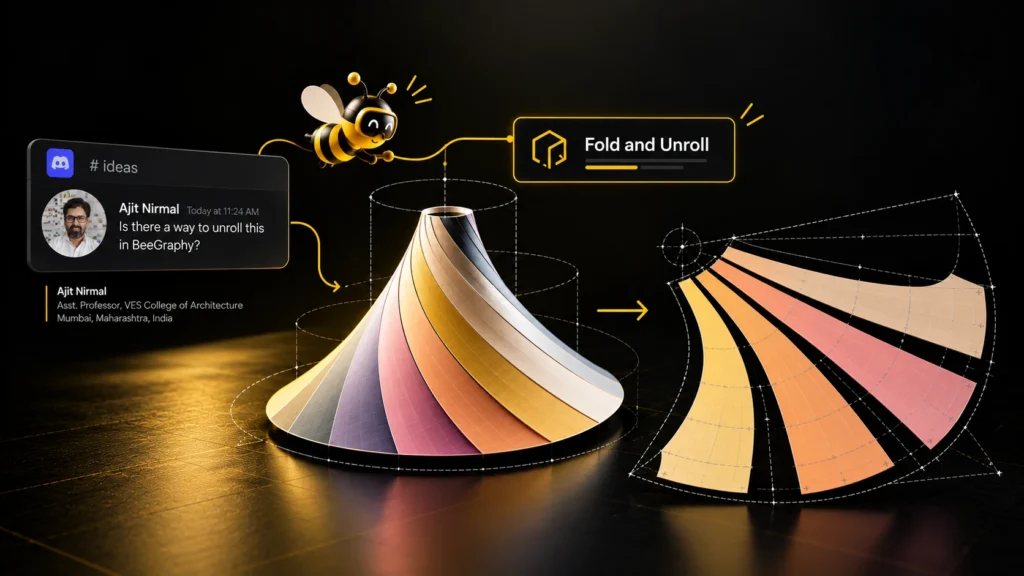
Fold and Unroll is a BeeGraphy plugin that unrolls 3D shapes into flat patterns ready to be cut from sheet material. It began as a feature request from a user, went public six days later, and its first update came straight from that user’s feedback. This is how a missing step in the editor became a tool anyone can use.
From Grasshopper to the Browser
Ajit Nirmal has used Grasshopper for years. The difficulty came when he wanted to hand control of a design to other people.
“I have been using Grasshopper for many years for myself, but when it comes to giving control of my design to my students, designers and clients, it was difficult, as not everyone has the software readily available.”
— Ajit Nirmal
That sent him looking for a tool that runs in the browser. He found two, ShapeDiver and BeeGraphy, and the difference between them decided his choice.
“ShapeDiver needs the user to upload their Grasshopper scripts, and then viewers can view it in the browser. BeeGraphy needs the user to make the entire workflow browser-based. ShapeDiver uses their own server to compute the solution and then the 3D geometry is rendered on screen, hence it limits the ability to make complex geometry in the free version. BeeGraphy computes the solution using the user’s CPU (that’s what I think, correct me if I am wrong), so the chance of making larger files becomes possible.”
— Ajit Nirmal
His guess is correct. BeeGraphy runs its geometry engine inside the browser, so a model is computed on the computer of whoever is using it.
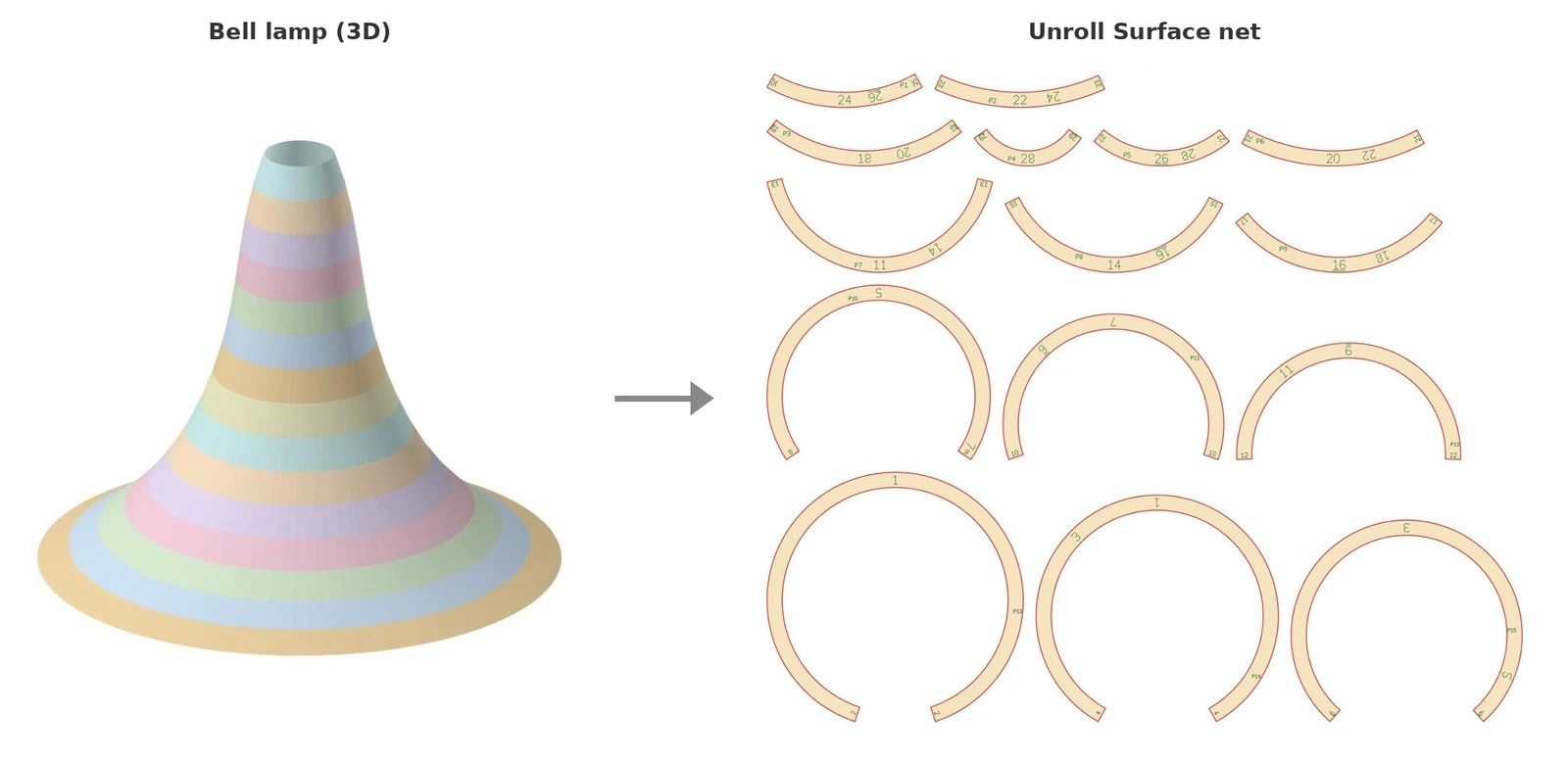
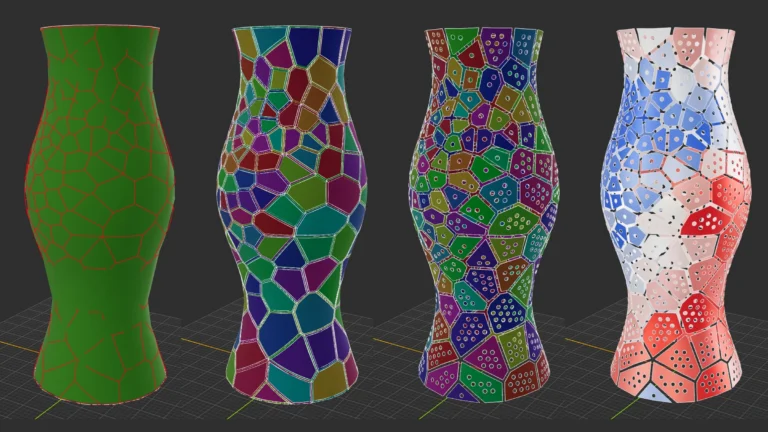
A bell-shaped lampshade and the flat strips Fold and Unroll lays out for it, ready to cut and join.
Exploring the Editor
His first project in BeeGraphy was for an architect friend who works with origami: a range of kirigami pop-up cards that had to be visualised folded and then exported as 2D lines for cutting and creasing. Work like this is only practical with parametric modeling.
Along the way he found that designs made in BeeGraphy can be sold on the BeeGraphy Marketplace, which encouraged him to develop more designs of his own.
Something Was Missing
The next design was a lampshade. Its side profile would be adjustable, and the shade would be made of strip-like modules cut from flexible sheet, joined by interlocking tabs along their edges.
The workflow had five steps: create the 3D form, divide it into strips, unroll the strips flat, draw the interlocking tabs along their edges, and export the lines for cutting. Every step could be built in BeeGraphy except the third. It needed ruled surfaces unrolled and polysurfaces unfolded into flat nets), and no node in the library did that yet.
So the request went to the BeeGraphy community on Discord:
“Unrolling the 3D surface into a planar surface was not possible with the tools natively available in BeeGraphy, so I asked for a plugin in the Discord forum.”
— Ajit Nirmal
The request came with references for the expected result: an article on ruled and developable surfaces used in fabrication and drawings of 3D forms developed into flat patterns. A clear picture of the end result is the most useful thing a feature request can contain.
One Request, Many Users
Unrolling is the step between a model on screen and a part that can be cut. Every face is laid flat, nothing stretches, and every edge is accounted for, so the pattern can be folded and joined back into the form.
The request covered two different jobs. Ruled surfaces are curved, but many can be bent from flat sheet, so they must unroll without stretching. Polysurfaces are made of flat faces, so they must unfold along their shared edges without one face landing on another.
The result also had to be ready for making: separate cut, fold and engrave lines, a matching number on both sides of every joint, and glue tabs. Shapes that curve in two directions, like a dome, cannot be covered by a single flat sheet at all, so they have to be cut into strips.
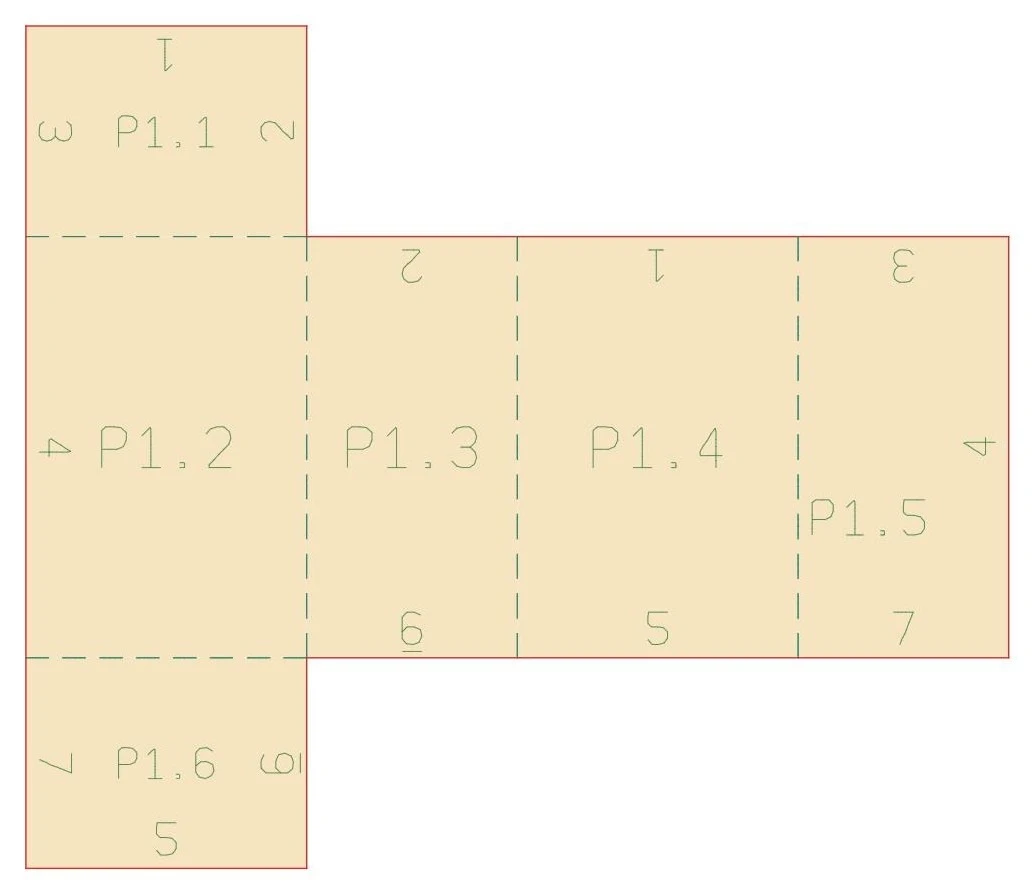
What a usable result looks like: a box laid out as one joined net, with glue tabs, fold lines and a matching number on both sides of every joint.
The same step appears in many fields, which is why Fold and Unroll became a public plugin rather than a one-off script:
- Lighting and product designers turn lampshades, pendants and fixtures into flat strips joined with glue or interlocking tabs.
- Architects and architecture students unroll curved roofs, shells and facades for study models, and check that a form can be built from sheet at all.
- Facade and cladding fabricators break curved panels into flat triangles to score and fold from rigid sheet such as aluminium composite or plywood.
- Packaging designers unfold boxes, cartons and displays into one net with glue tabs, and check every flap before a die is made.
- Paper engineers and model makers get origami, kirigami and pop-up designs with separate cut, fold and engrave lines.
- Makers, fab labs and workshops send cut files straight to a laser cutter or CNC knife, and get new ones whenever the design changes.
- Educators and students use Refold Net to show how a flat net folds into a solid, and Fold and Unroll to teach developable surfaces hands-on.
- Marketplace sellers publish adjustable products on the BeeGraphy Marketplace that still come out ready to cut.
Because Fold and Unroll works inside the node graph, the flat pattern updates with the design. Change the form or a slider, and the cut file follows.
Building the First Version
Six days after the request, Fold and Unroll was public on BeeGraphy. The single node that had been asked for became four nodes that work together:
- Unroll Surface lays a shape out flat. Curved surfaces become strips that unroll without stretching.
- Triangle-Strip Unroll turns curved faces into strips of flat triangles, for rigid sheet that folds facet by facet.
- Fold Back Check folds the flat pieces back into 3D and checks that every joint meets its partner.
- Refold Net folds a net open and closed with a single slider.
In a typical graph, a form goes into Unroll Surface or Triangle-Strip Unroll, the flat pieces go on to Fold Back Check, and the Cuts and Engrave outputs go to the machine. Refold Net can sit beside them to preview or animate the fold. Fold and Unroll lays every piece out on the XY plane, names it, and numbers each joint the same way on both sides, so the pieces find each other during assembly.
Unroll Surface in the BeeGraphy viewer: a box laid out as one joined net, with glue tabs and numbered joints.
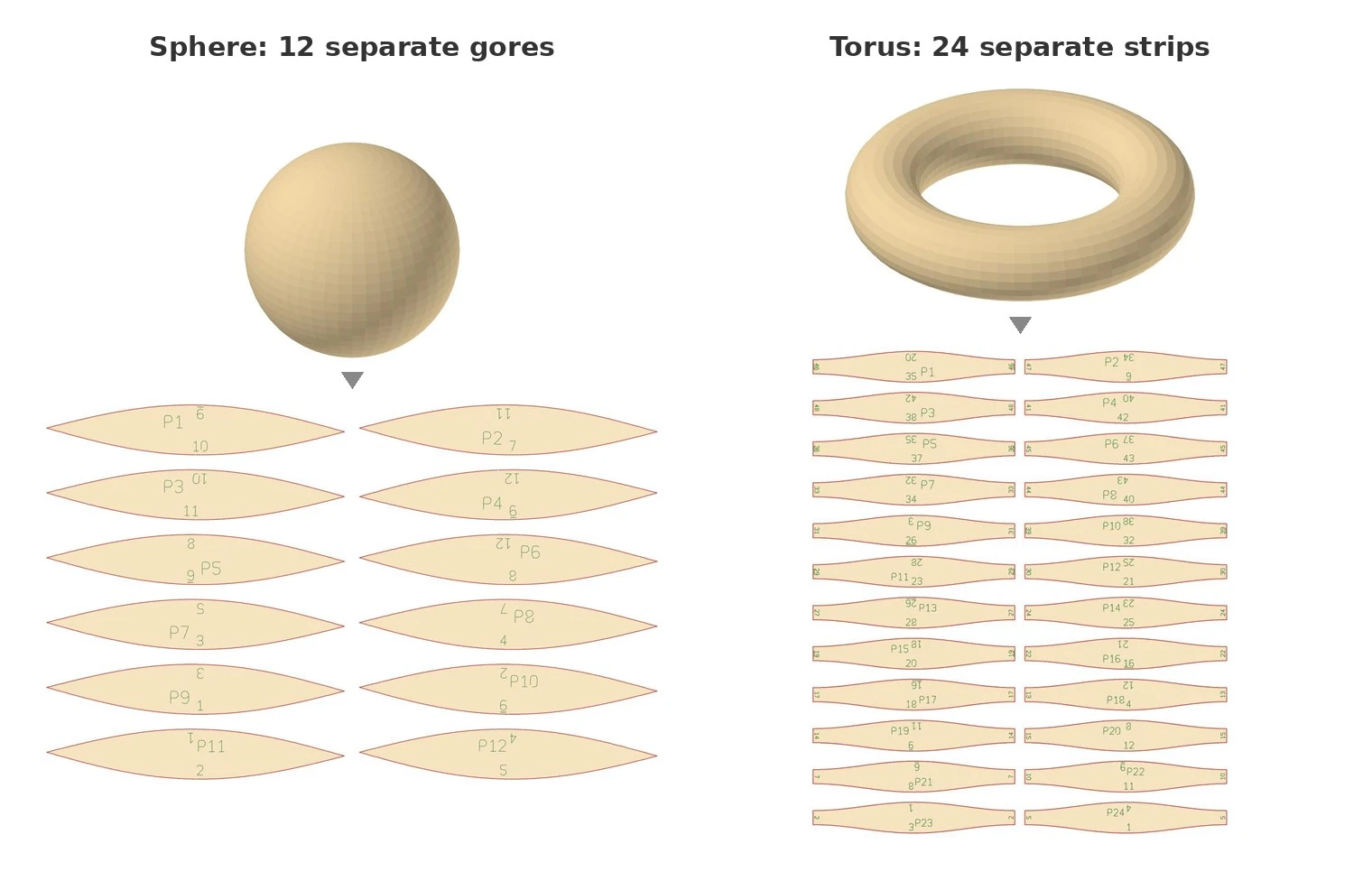
Shapes that curve in two directions, like a sphere or a torus, are cut into strips that unroll without stretching.
The first version of Fold and Unroll was released as soon as it was useful rather than when it was finished, so it could be tested on real forms straight away. The response came the same day:
“To my surprise, this kind of plugin tool already existed and the BeeGraphy team made it available to me. Using it was intuitive and it worked as expected.”
— Ajit Nirmal
Feedback From Real Use
Over the next two days, three observations came back from using Fold and Unroll on real forms. None of them were errors. Each one only appeared when the result was taken further, into an actual project.
Kinks along the long edge. The long edge of an unrolled strip bent in around thirty small kinks. The request was for an adjustable count, or for the edge to come out as one smooth curve.
Flaps that could not be shaped. Triangle-Strip Unroll added glue flaps, but their shape could hardly be controlled. For a lampshade held together by interlocking tabs, the shape of the tab is the whole point, so the suggestion was simple: let the flap take a custom curve.
Edges that took guesswork. Getting the two long edges of each strip meant guessing the order of the control points and rebuilding the edges with Extract Subset, and the number of points changed with every form. Those edges are where the tabs are drawn, so each new form added guesswork and room for error.
Fold and Unroll 0.6.0
Two days after the last observation, Fold and Unroll 0.6.0 answered all three. Each change was built to help every user, not only this one lampshade:
- Smooth Edges draws each strip edge as one smooth curve instead of a chain of short straight segments. That removes the kinks and gives cleaner paths for a laser cutter or CNC knife.
- Tab Shape takes any curve you draw and uses it as the shape of the glue tabs, on both unroll nodes. Tab Count sets how many tabs each edge gets.
- Edges is a new output with the left, right, start and end edges of each strip as separate curves, ready for the next node in the graph. No more guessing control points.
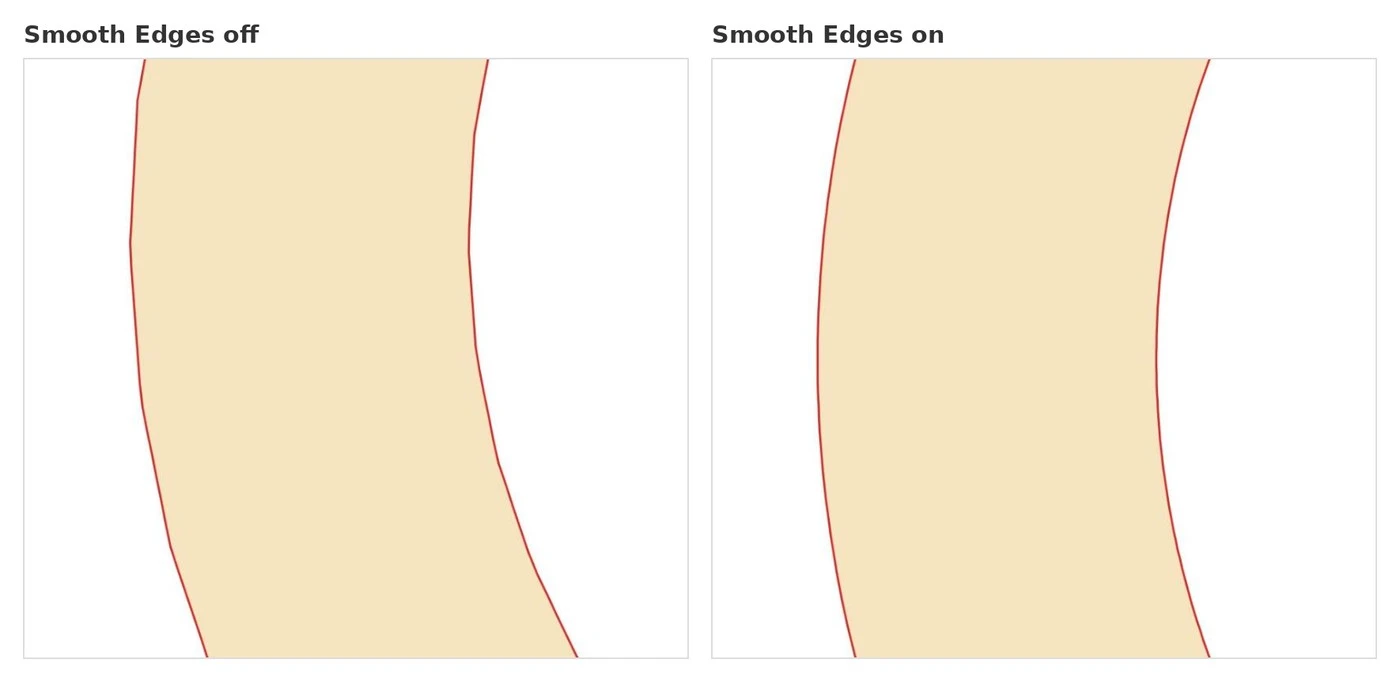
Smooth Edges off and on: the kinks along the strip edge become one smooth curve.
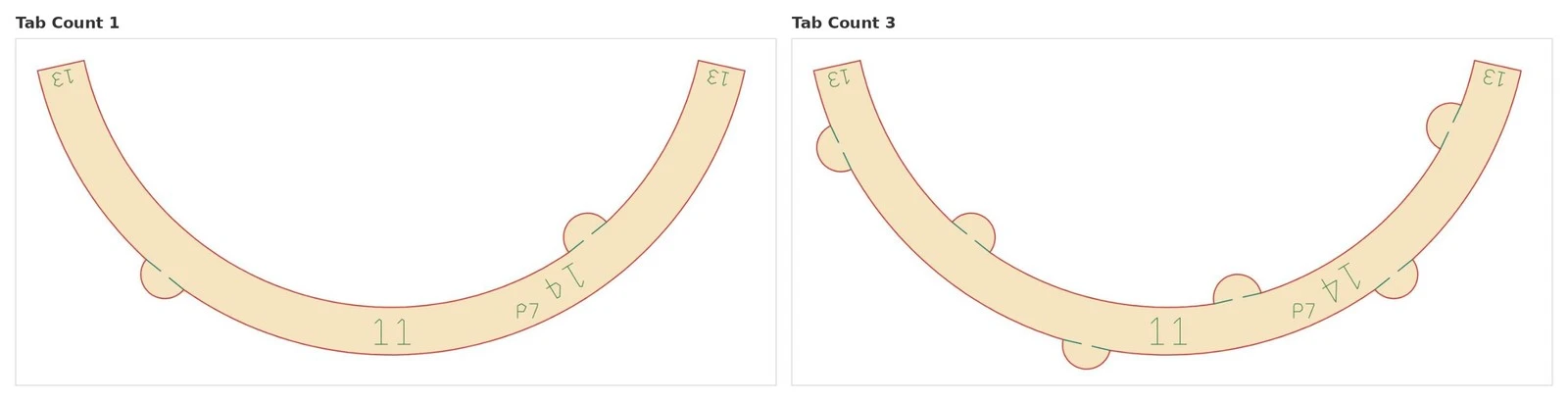
A round curve plugged into Tab Shape, with Tab Count 1 and 3.
The same evening, a custom curve drawn in Curve Editor was already shaping the tabs of a lofted surface in his own graph. Feedback like this keeps shaping Fold and Unroll: each round of real use points to the next improvement.
What the Process Shows
Ten days passed between the first question and a version shaped by real use. A few things made that possible.
Start from a real project. A request tied to a design someone is actually making shows the need behind it, not only the feature being asked for.
Solve it for everyone. A one-off script would have helped one lampshade. As a public plugin, Fold and Unroll helps every designer who works with sheet material, including people who never ask.
Release early. A first version of Fold and Unroll in real hands taught more than any test shape. Test shapes can show that a net is correct; only real use shows what a designer needs to do with it next.
Keep feedback specific. Each observation said what was being attempted, what got in the way and what might fix it. That is why the update took two days instead of a long back and forth.
Frequently Asked Questions
What is Fold and Unroll?
Fold and Unroll is a public BeeGraphy plugin that lays 3D shapes out as flat patterns for cutting from sheet material. It has four nodes: Unroll Surface, Triangle-Strip Unroll, Fold Back Check and Refold Net.
Can Fold and Unroll unroll a sphere?
Yes, as strips. Sheet cannot stretch, so doubly curved forms such as spheres and domes are cut into strips that each unroll exactly. They always come out as separate pieces.
Does Fold and Unroll work with any shape?
It takes any Solid or Surface in BeeGraphy, or a list of them. Flat-faced shapes such as boxes and pyramids unfold into joined nets, and curved surfaces are cut into strips that unroll without stretching.
How can I check a net before cutting it?
Connect the pieces to Fold Back Check. It folds them back into 3D, tests that every numbered joint meets its partner, and reports PASS or CHECK, so a mistake shows up on screen instead of on the cutting bed.
When should I use Triangle-Strip Unroll instead of Unroll Surface?
Use Unroll Surface for sheet that bends, such as paper, card or thin plastic. Use Triangle-Strip Unroll for rigid sheet that is scored or folded facet by facet, such as plywood or aluminium composite.
Which lines go to a laser cutter?
Export Cuts for the lines to cut through, and Engrave for the lines to mark or score. Engrave already includes the fold lines.
How do I request a feature in BeeGraphy?
Post in the BeeGraphy community on Discord. Describe what you are building, the result you expect and what is in the way.
Try Fold and Unroll
Fold and Unroll is public, so it can be added to any BeeGraphy project today. The step-by-step Fold and Unroll guide on the help center covers every node and setting. If something is missing in the editor for your own project, the BeeGraphy community on Discord is the place to say so.
Thanks to Ajit Nirmal for the request and the feedback behind Fold and Unroll.